
Enamel Icons - Icon Pack1.0.4 - Google Play
You'll be able to see results in few seconds.
Publisher Description
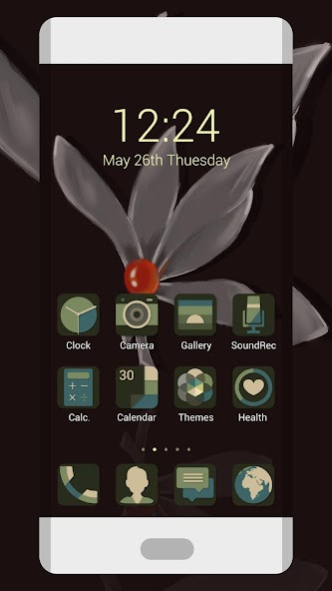
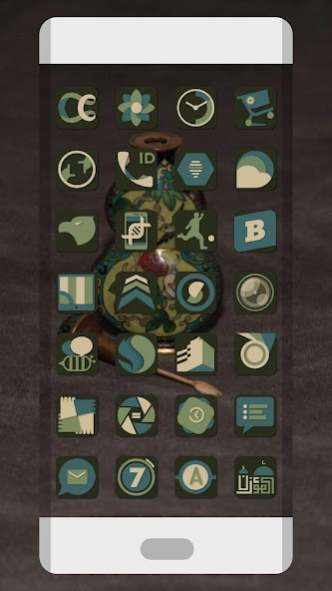

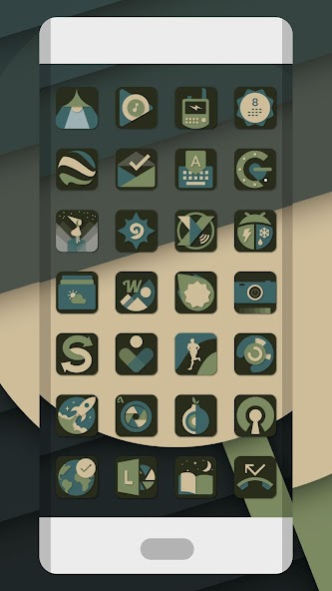
Enamel is inspired by Chinese enamel color, retro elegant colors with material design concept.
Enamel Icons has this features:
- Enamel color, retro design.
- Elegant icon pack.
- 2800+ icons (192x192 xxxhdpi)
- 10+ HD Wallpapers
- Supports most major launchers
- Built-in Icon Request
- Continuous updating and optimization
Supported launchers:
☑ Nova Launcher
☑ Apex Launcher
☑ ADW
☑ Inspire Launcher
☑ Smart Launcher
☑ Atom Launcher
☑ Aviate Launcher
☑ Solo Launcher
☑ S Launcher
☑ CM11 themes Only icons
☑ Slide
☑ Winterboard
☑ KK Launcher
☑ M Launcher
☑ N Launcher
☑ Mini Launcher
☑ Holo Launcher
☑ Action Launcher Pro
☑ Go Launcher (icons only)
☑ Unicon only Icon
☑ Walpaper design and resolution
Hope to works well with many others.
All icons in Enamel Icon Pack look clear and delicate,because they are made in the highest definition.
Icon Requests
The icon pack provides Icon Requests.To request icons,please open this green icons and navigate to the Icon Request section. We will continue to strive to add add new icons,as well as update existing icons to keep pace with new application icon.
Imperfect icons
If you find some icons aren't perfect or synchronized with the existing app icon, please tell us by email instead of giving a bad rating. Thanks very much!
If you like this elegant icons, please RATE us and share it to your friends,and also you can give us more suggests.
Thanks!
About Enamel Icons - Icon Pack
The company that develops Enamel Icons - Icon Pack is CraftsApp Team. The latest version released by its developer is 1.0.4.
To install Enamel Icons - Icon Pack on your Android device, just click the green Continue To App button above to start the installation process. The app is listed on our website since 2018-05-06 and was downloaded 0 times. We have already checked if the download link is safe, however for your own protection we recommend that you scan the downloaded app with your antivirus. Your antivirus may detect the Enamel Icons - Icon Pack as malware as malware if the download link to craftsicons.iconpack.enamel.icons is broken.
How to install Enamel Icons - Icon Pack on your Android device:
- Click on the Continue To App button on our website. This will redirect you to Google Play.
- Once the Enamel Icons - Icon Pack is shown in the Google Play listing of your Android device, you can start its download and installation. Tap on the Install button located below the search bar and to the right of the app icon.
- A pop-up window with the permissions required by Enamel Icons - Icon Pack will be shown. Click on Accept to continue the process.
- Enamel Icons - Icon Pack will be downloaded onto your device, displaying a progress. Once the download completes, the installation will start and you'll get a notification after the installation is finished.
Program Details
System requirements
Download information
Pricing
Version History
version 1.0.4
posted on 2018-05-06
*** We are working day and night on this icon pack, improving and adding more icons, so you can support me rating with 5 stars :) ***
V1.0.4:
. Added new 50+ icons available ( more than 3870+ available );
. Added support for Nova Launcher and Smart Launcher; . Improved some strings in the app;
. Fix some bugs. Please enjog the Galaxy S8 style icons, Thanks!
Disclaimer
Official Google Play Link
We do not host Enamel Icons - Icon Pack on our servers. We did not scan it for viruses, adware, spyware or other type of malware. This app is hosted by Google and passed their terms and conditions to be listed there. We recommend caution when installing it.
The Google Play link for Enamel Icons - Icon Pack is provided to you by apps112.com without any warranties, representations or guarantees of any kind, so access it at your own risk.
If you have questions regarding this particular app contact the publisher directly. For questions about the functionalities of apps112.com contact us.
